
Imagine you are surfing on the internet and see your favorite products on sale 😍
Biggest Discount Ever!!!OFFER ENDS IN
Hurry! Grab the deal
When we see such attractive offers ending…we BUY it immediately before they run out. That Fear of Missing Out drives us to bang the BUY button before anyone else.
As the timer passes every minute and second, it encourages to avail that specific deal. Right? We all have experienced this in our everyday lives.
From creating a sense of urgency for attractive offers to building excitement for your new product launch, Countdown Timer can give promising results.
To give you more power to drive conversions, we are introducing the Countdown Timer widget for Elementor.
How Countdown Timer Widget Can Help?
Countdown Timer is a multipurpose widget that can be used while building –
- Coming soon page for your website
- Exciting landing page for new product launch
- Release for an awaited online course
- Remaining valid time to buy concert tickets
- Mark important events like birthdays, weddings
- Registration for meetups/ webinars
- One time offer for the season
And many more similar events like above.
This widget can be helpful for almost all online shopping sites. Where users can shop 24/7 but need that extra push to make a purchase right away.

What Do You Get With the Widget?
Countdown Timer widget is flexible and can be molded the way you want. Here are some sneak peeks of what you get with this widget –
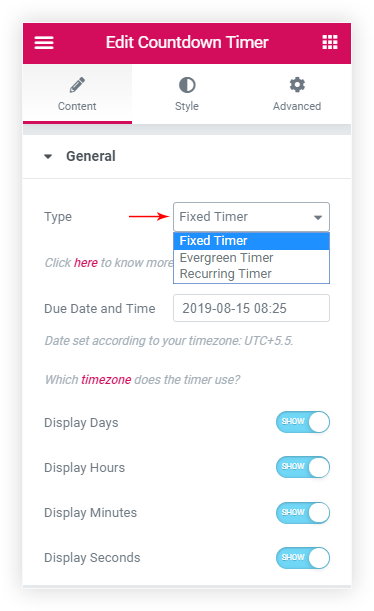
Different types of timer (Fixed, Evergreen, Recurring) to suit your every need
An evergreen timer can display offers that have a specific time to avail the deal. The fixed timer can create a feeling of anticipation. You can use this to announce offers or an event on a specific day. The recurring timer will repeat after a specific interval of time. So that you can arrange a sale every Monday or every month.
Choose action on timer expiry
As soon as the timer ends you can redirect it to another URL or show a nice message. If you don’t want the timer to show anymore you can hide it.
Custom labels for time format
The timer has labels for different time formats like days, hours, minutes and seconds. You can change these labels and set some attractive strings.
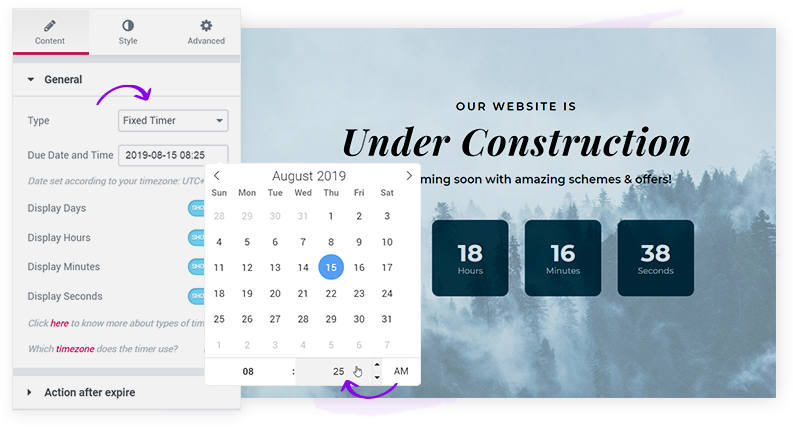
Easy setting to choose due Date and Time
A small calendar will let you select date easily along with time. Fixed timer and Recurring timer will display such calendar.
The timer has prebuilt layouts like a circle, square, rounded. You can even manage separators and overall design and typography of the timer.
Responsive support
The widget takes care of the timer responsive view. So your timer looks nice on smaller devices.
Flash Animation when the timer is about to expire
It’s an attention-grabbing animation that will indicate the timer is about to expire. See how it works –
Excited to See How This Works?
Eager to see how this new widget can make a boom? Countdown Timer is a great way to display how soon somethings can start or expire.
Update Ultimate Addons for Elementor to the latest version and start building attractive timer on website.
Here is a stunning demo page that shows how you can design timers in different ways. Dig into the knowledge base for any help with the widget.
Let us know how you like it! In case of any query write us. We would love to hear your thoughts in the comments below.





20 thoughts on “Influence Visitors with Countdown Timer In Elementor”
And when it expires? Is there an option to redirect visitors to another page? It would be great to not have to remember to go in and set a redirect or delete the page later.
Yes! Countdown Timer provides after expiry actions. You can choose whether you want to ‘hide’ the timer, or ‘show a message,’ or even you can ‘redirect’ the users to the specific page. Here is an article for more information.
Look good….
Now it just need to take dynamic dates as input, and I can use it with my Events CPT…
Currently, the widget uses DATETIME control of Elementor that doesn’t support dynamic field functionality yet. But, we already have this feature in our future enhancements list, and we will surely work on it.
That’s awesome, when is Countdown Timer going to be released for UABB?
Glad to tell you that UABB already has a Countdown Module. Have a look at the demo here.
Does the timer work with WooCommerce items on sale? That would be very useful.
Currently, the widget doesn’t fetch dynamic values so it might not directly work with WooCommerece sale. But you can set the timer manually as per the sale requirements.
Is this feature available in the free astra version or only with pro version?
Countdown Timer is a widget in the Ultimate Addons for Elementor plugin. This widget is not a part of the Astra theme. But if you own Astra Essential Toolkit (UAE) or Astra Business Toolkit then you get this plugin in the package. You can use it with the Elementor page builder along with the Astra theme and build attractive Countdown Timer.
Cool widget thanks!
But it could be more powerful if you would add an option to use the deadline date and time from Custom Post Tyme with a respective ACF field.
We have this in our to-do list and will work on it in the future. The widget uses DATE TIME control from Elementor that doesn’t work with dynamic field functionality yet.
Do you plan to add this to the Ultime Gutenberg plugin as well?
Sorry but currently we don’t have plans for this. But your request is forwarded to the UAG team and we will definitely think about this. 🙂
Could it be possible to make the countdown automated very 24 hours without haven to set it everyday.
As of now, you can use the Recurring Timer for this. You can set the timer for the time you want and then set it to recur every day with setting the Reset Timer After to 1 day.
Please feel free to get in touch if you need any further help.
It’s really cool. I have used the Elementor page builder for most of the sites.
Glad to hear that! 🙂
Is there a way to add centiseconds or milliseconds?
Hello,
We found that centiseconds and milliseconds are rarely used and therefore the Ultimate Addons countdown timer supports up to seconds only.