
Have you ever embedded a YouTube or Vimeo video on your website?
If you have, take a moment and check how it has affected the speed and performance of your webpage.
- Go to Pingdom.
- Paste the URL where you have embedded the YouTube video.
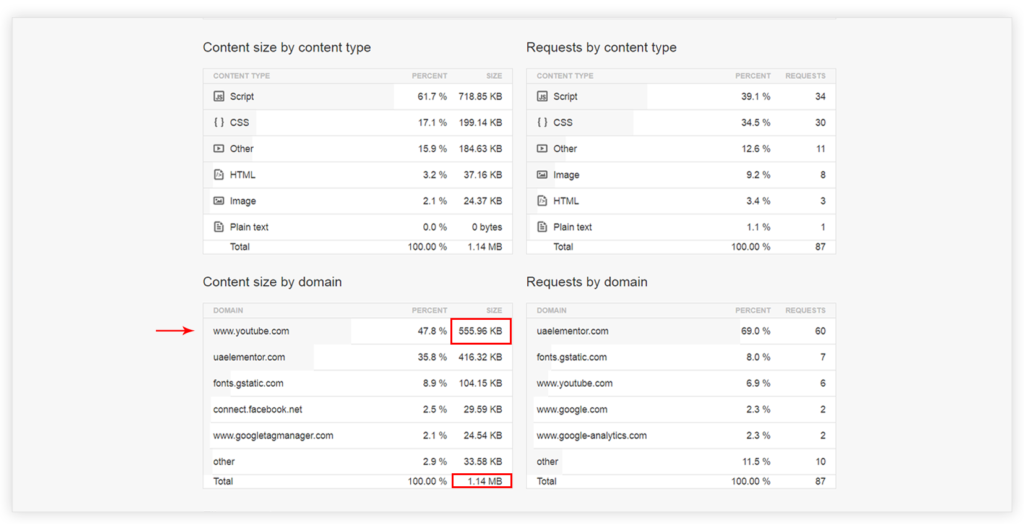
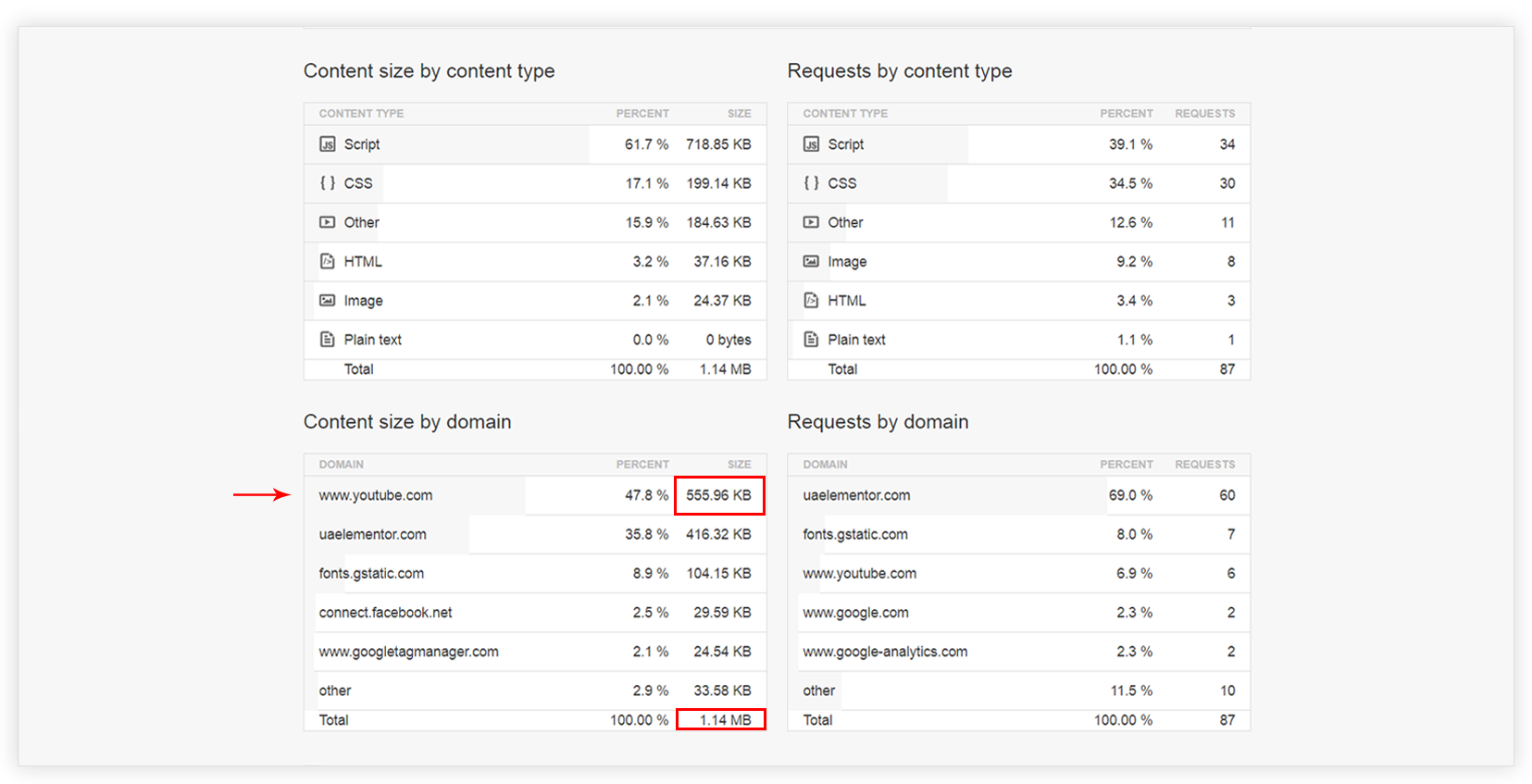
- You’ll notice that the YouTube Video alone consumes about half MB of extra JavaScript files. ?
The strange part is that these files are downloaded even if the user does not play the embedded video. This affects the page load time for no constructive reason at all!
So today, we are introducing an innovative Video widget for Elementor that will allow you to embed YouTube and Vimeo videos without sacrificing the performance ?
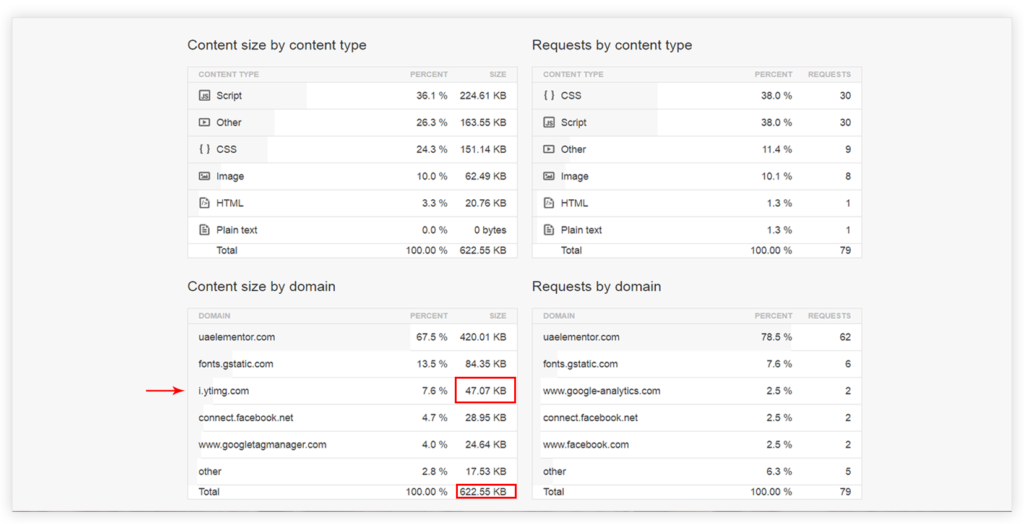
Just to show you how effective this widget is, below is the screenshot of the speed test results of the same page that is tested above, but – after embedding the video with our new widget ?
Please take a moment to watch a walkthrough video which explains how exactly this widget works.
We have updated our Modal Popup widget as well with the same technique. So if you have embedded videos in the modal popup or plan to, rest assured, we have taken care that the videos won’t affect the performance of your website.
Please update to the latest version 1.4.0 and try replacing your existing video embeds with this new widget. Don’t forget to let us know the difference you will see in the speed of your website in the comments below!
Cheers!





16 thoughts on “Introducing Faster Loading Video Widget for Elementor”
Great widget, UAEL widgets are unique and awesome. waiting for more amazing widgets..
Thanks for your feedback! 🙂
Awesome …. A Very useful addon element for Elementor indeed….
I just wanted to ask that why cant an option to incorporate ‘custom call to action’ to arrive at a specific time in the video or at the end of the video.This would help the marketeers a lot to improve the conversions or to collect more leads.
Also Like ‘Advanced Menu’ in Beaver Builder addon , can we have a similar addon in UAE.
Also a ‘Table of Content’ Addon would be a great addition to Elementor and is also not included in their pro version ….A similar functionality is seen as ‘Quick Navigation’ in Thrive architect….
Thanks for the suggestion! We will try to add your suggestions in future updates.
That’s pretty slick!
Thanks 🙂
Thanks for this update! But please could you load the thumbnails over SSL? My site is no longer marked as secure after implementing the new video widget.
There seems something conflicting. Can you please open a support ticket for this so we can take a closer look?
Please provide either a “pop-up” of the images or larger images in your posts. I can’t read the numbers. I have to “zoom in”.
Thank you for the nifty-cool update with the Video Widget.
We have added the lightbox support for post images; so when you click, they will open in full screen. 🙂
AMAZING! so hyped for this.. really hope it will speed up my very much video bloated website.
Should I do anything if the videos are in a UAE Modal Pop-Up, or will it be updated by updating the plug-in?
Thanks 🙂
The Modal Pop-Up videos will automatically improve their speed after updating the plugin. 🙂
Very cool. I’ve needed this. But when I update to 1.4.0 and try the new widget, I have 2 issues:
1) I can’t figure out how to open the video in a modal window. Is that not an option with the widget?
2) The play button appears below the thumbnail rather than centered on top of it. See https://www.screencast.com/t/3Unjypg4QUD.
1) We have separate Modal widget for this. Please refer this article for more detailed information.
2) It seems cache issue. Please check your webpage after clearing cache.
hi
I understand that if YouTube videos are included in the article, SEO rankings will increase. Wouldn’t using Video Widget have a bad effect on the ranking?
I can’t seem to get the Vimeo video link to work! Is there a video or document to show where the right link is found?